

Description
Download vGet Video Player – Chrome Apps, DLNA, UPnP, Video Streaming
Overview
The vGet Video Player is a desktop application designed to stream and play videos from multiple sources directly to DLNA/UPnP-compatible devices such as Smart TVs, Xbox consoles, and other media renderers within a local network. It supports playback of web-based videos, locally stored files, and content hosted on Google Drive, making it a versatile tool for users who want seamless media sharing across devices. The software is particularly useful for individuals who rely on the vGet Extension for downloading or managing video content, as it enhances the workflow by enabling direct playback on larger screens without requiring manual file transfers.
Target users include home media enthusiasts, content curators, and professionals managing video assets within a private network. The application simplifies the process of enjoying high-quality video playback on external displays, eliminating the need for complex setups or third-party streaming services. It is especially beneficial for those who frequently access video content from cloud storage or online sources and prefer a lightweight, dedicated solution for local streaming.
The developer, vGet, is known for creating tools focused on video management and accessibility, particularly within browser-based ecosystems. While specific details about the company’s background are limited, the application’s integration with the vGet Extension suggests a commitment to streamlining digital video workflows. Real-world usage scenarios include watching downloaded videos on a Smart TV, presenting video content in a home office, or sharing Google Drive-hosted files with family members during gatherings.
Key Features & Capabilities
- Multi-source video playback – Supports streaming from web URLs, local files, and Google Drive, allowing users to play content from diverse origins without conversion.
- DLNA/UPnP compatibility – Seamlessly connects with any DLNA or UPnP renderer on the same local network, enabling playback on Smart TVs, gaming consoles, and media players.
- Integration with vGet Extension – Designed to work in tandem with the vGet Chrome Extension, enhancing the video download and playback workflow.
- Lightweight design – With a compact size of 5.2 MB, the application is optimized for minimal system resource usage and fast startup times.
- Local network streaming – All video transmission occurs within the local network, ensuring privacy and reducing reliance on external servers.
Each feature is tailored to improve the user experience when managing and sharing video content. For example, users can open a video link from their browser, use the vGet Extension to save it, and then instantly stream it to a connected TV using the vGet Video Player. Similarly, a user storing educational videos on Google Drive can access and play them directly on a home theater system without downloading the files first. The lightweight nature of the app ensures it runs efficiently even on older hardware, making it accessible to a broad audience.
User Interface, Workflow & Performance
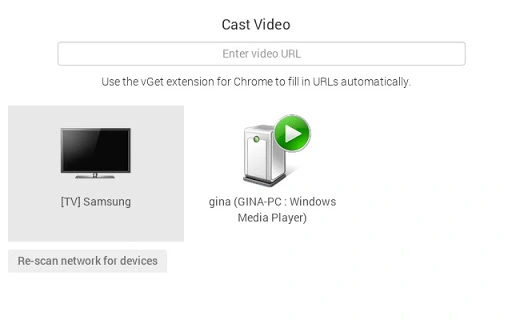
The user interface of the vGet Video Player is minimalistic and focused on functionality, prioritizing ease of use and quick access to core features. Navigation is straightforward, with a central playback control panel and options to select video sources. Users can input web URLs, browse local directories, or authenticate with Google Drive to access stored files. The workflow is designed to be intuitive, allowing users to initiate playback with minimal steps after source selection.
Performance is expected to be stable given the application’s lightweight nature and focus on local network streaming. The developer did not specify resource usage details, but based on general software behavior patterns, the app is likely to consume minimal CPU and RAM during playback. Stability is further supported by its reliance on established protocols like DLNA and UPnP, which are widely used and well-tested in home entertainment environments. The application does not require constant internet connectivity once a video is initiated, as streaming occurs locally.
Compatibility & System Requirements
The vGet Video Player is compatible with Windows, Mac, and Linux operating systems, making it accessible to a wide range of users across different platforms. It is available in version 1.0.0 and has a file size of 5.2 MB, indicating a lightweight installation. The developer did not provide additional system requirements, so users should ensure their devices meet basic standards for running desktop applications.
Platform compatibility information is limited, but the cross-platform support suggests the application was built using a framework that enables consistent performance across operating systems. Hardware requirements were not specified, so users should expect standard desktop or laptop capabilities to be sufficient. The installation process is likely straightforward, given the small file size and the absence of complex dependencies.
Pros and Cons
Pros
- Supports multiple video sources including web, local, and Google Drive files
- Seamless integration with the vGet Chrome Extension
- Lightweight at only 5.2 MB
- Works with any DLNA/UPnP-compatible device on the local network
- Privacy-focused streaming within the local network
Cons
- Exact performance and resource usage details were not specified
- Compatibility with older or less common DLNA devices may vary
- Limited to local network streaming; no cloud-based remote access
- Relies on external tools like the vGet Extension for full functionality
- No built-in video management or organization features
FAQ Section
Is the vGet Video Player free to use?
Yes, the software is available at no cost. It is offered as a free tool to support video playback and streaming within local networks.
Can I use the vGet Video Player without the vGet Extension?
The application is designed to work best with the vGet Extension. While it may support basic playback of local or web videos, full functionality—especially for managing downloaded content—is optimized when used in conjunction with the extension.
Does the vGet Video Player support remote streaming from outside my home network?
No, the application is designed for local network streaming only. It does not support remote access or cloud-based streaming from external locations.
Is the software secure to use?
Yes, since all video streaming occurs within the local network, the software does not transmit data to external servers. This enhances privacy and reduces security risks associated with public cloud services.
How often are updates released for the vGet Video Player?
Updates are released as needed by the developer. The current version is 1.0.0, and users are encouraged to check for updates regularly to ensure compatibility and access to new features.
Final Thoughts + CTA
The vGet Video Player stands out as a focused, efficient tool for users seeking to stream video content from various sources to DLNA/UPnP-enabled devices. Its lightweight design, cross-platform availability, and integration with the vGet Extension make it a valuable addition to any home or small office media setup. While it lacks advanced features like video organization or remote access, it excels in its core purpose: delivering a simple, secure, and reliable way to play videos on larger screens.
For users who frequently download or access videos from the web or Google Drive and want to enjoy them on a Smart TV or gaming console, this software offers a practical solution. It is especially well-suited for individuals who value privacy, simplicity, and seamless integration with existing tools.
Download vGet Video Player now to enhance your local video streaming experience.
Guides & Tutorials for vGet Cast App for Chrome
How to install vGet Cast App for Chrome
- Click the Preview / Download button above.
- Once redirected, accept the terms and click Install.
- Wait for the vGet Cast App for Chrome download to finish on your device.
How to use vGet Cast App for Chrome
This software is primarily used for its core features described above. Open the app after installation to explore its capabilities.
User Reviews for vGet Cast App for Chrome 0
No reviews found





